Lab Day: Do You Need an AI Agent, a Tool, a Skill, or MCP?
What's the difference between an AI agent, a tool, a skill, and an MCP server? Four ideas under all the branding, and a decision list for what to build.

You want AI to do a job for you. Simple enough. You search for how, and within five minutes you're drowning: agents, tools, skills, MCP servers, plugins, connectors, function calling. Every blog post assumes you already know the other six terms. Every vendor uses the same words to mean slightly different things.
Here's the thing: there are only about four actual ideas underneath all of this. The rest is branding.
We'll build one system — on paper, no code to run — and let each concept introduce itself the moment we actually need it. The job: read incoming invoices, categorize them, and produce a monthly summary. Boring, universal, and exactly the kind of task this entire ecosystem exists for.
By the end, you'll be able to look at any AI task and answer the only question that matters: what do I actually need to build?
Start With Nothing
Before building anything, let's see how far the raw model gets.
Open any chat interface. Paste the text of an invoice. Type: "Categorize this expense and extract the amount, date, and vendor."
It works. The model reads the invoice, pulls out the fields, guesses a sensible category. No agent, no tools, no infrastructure. This is worth pausing on, because it's the most skipped step in the entire ecosystem: a surprising number of "AI projects" are solved by pasting text into a chat window.
But our job description says incoming invoices, monthly summary. That means:
- Someone has to notice a new invoice arrived
- Someone has to copy its contents into the chat
- Someone has to collect the results somewhere
- Someone has to remember to do this every day
And that someone is you. We haven't automated the work — we've automated the middle 20% of it and kept the boring 80% for ourselves.
The model is a brain in a jar. It can think about anything you show it, but it can't see anything on its own, can't touch anything, can't remember it's supposed to act. Every gap in that sentence is one of our concepts. Let's fill the first one.
Tools: Giving the Brain Hands
The first gap: the model can't read a PDF sitting in a folder. It only knows what you paste into the conversation.
A tool is a function you hand to the model. Not code the model writes — code you write (or someone wrote), described to the model like this: "There's a function called read_pdf. Give it a file path, it returns the text." That description is all the model sees.
Here's what that description actually looks like — this is the whole thing the model receives:
json{
"name": "read_pdf",
"description": "Read the text content of a PDF file. Use this when you need to see what's inside a PDF document.",
"input": {
"path": "string — the file path to the PDF"
}
}That's it. No PDF-parsing code here — that lives on your side. The model just learns that a hand called read_pdf exists, what it's for, and what to feed it. When it decides to use it, it emits a request like this:
json{
"tool": "read_pdf",
"path": "/invoices/acme-march.pdf"
}Your code catches that request, runs the actual PDF library, and hands the text back. The model never saw the library. It only ever sees the door.
Two things are worth engraving here, because they prevent most of the confusion later:
The model never executes anything. It requests. Your code executes. The model is a manager dictating instructions through a door — it never leaves the room.
The model decides when to use a tool. You don't write if invoice then read_pdf. You describe what the tool does, and the model reasons its way to using it. This is the whole trick, and it's why tool descriptions matter more than tool code.
So we add read_pdf, and maybe save_result to write categorized data into a spreadsheet. Our system now has hands.
But the invoices don't live in a folder. They live in an inbox. And that's where the next word enters.
MCP: The Plug Standard
We need the model to reach into an email inbox. Fine — write a tool. list_emails, get_attachment. A day of work with the Gmail API, maybe two.
Now zoom out. Thousands of teams are building AI systems this quarter. Most of them need email access. Each one is writing the same Gmail tool, slightly differently, with slightly different bugs. Then the same Slack tool. The same database tool. The same calendar tool.
This is the problem MCP (Model Context Protocol) exists for. It's a standard way to package tools so they can be written once and plugged into any AI application that speaks the protocol. Someone — a big vendor, a startup, a random developer — builds a Gmail MCP server: a small program that exposes list_emails and get_attachment in the standard format. You connect it to your AI app, and those tools simply appear in the model's tool list:
Connected MCP server: email
Tools now available to the model:
- list_emails(query)
- get_attachment(email_id, filename)
- send_email(to, subject, body)You didn't write any of those. You connected a server, and the hands appeared.
The comparison that makes it click: USB. Before USB, every device shipped its own connector and every computer needed the matching port. USB didn't invent the mouse or the keyboard — it standardized the plug. MCP doesn't invent tools. It standardizes how they're offered.
Which resolves the question that confuses everyone at first: tool or MCP — which one do I need? Wrong question. MCP servers contain tools. You're not choosing between them; you're choosing between writing a tool yourself or plugging in a server someone already wrote.
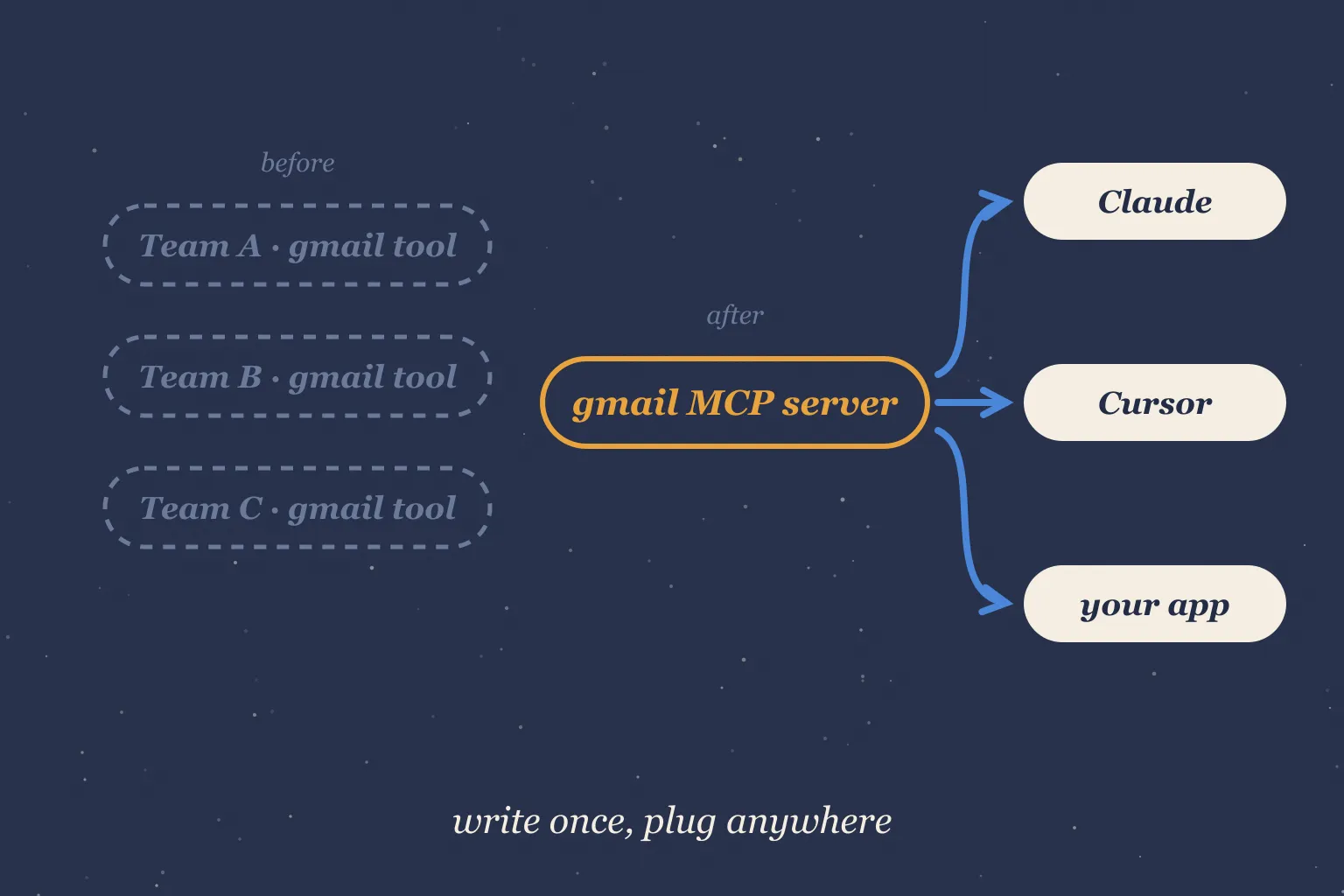
For our invoice system: we don't write email tools. We connect an email MCP server and move on. Ten minutes instead of two days.
The hands now reach everywhere they need to. But the brain still doesn't know our rules.
Skills: Teaching It Your Rules
Watch what happens when the system runs. It reads an invoice from a restaurant, categorizes it as "Meals." Reasonable. Except in our company, a restaurant invoice above 5,000₺ is "Client Entertainment" — different budget, different tax treatment. The model had no way to know that. It's not in any training data. It's in our heads.
You could paste these rules into the conversation every time. That works exactly until you forget, or a teammate runs the system without knowing the rules exist.
A skill is those instructions, packaged. A folder — typically a markdown file, maybe with reference documents next to it — that says: here's how we handle this task. For our invoices, it looks like this:
markdown# Invoice Categorization
## Description
Use when categorizing expense invoices for the monthly report.
## Categories
Software, Facilities, Meals, Client Entertainment, Travel, Misc
## Rules
1. Restaurant/cafe invoice over 5,000₺ → Client Entertainment
2. Restaurant/cafe invoice at or under 5,000₺ → Meals
3. Anything from the office landlord → Facilities (never Misc)
4. Known SaaS vendors → Software (see list)
## Known Software Vendors
GitHub, Vercel, Figma, Notion, AWS, Google Workspace
## Constraints
- Never guess a category when the amount is missing — flag for review
- Never use Misc when a specific category appliesUse when categorizing expense invoices for the monthly report.
Software, Facilities, Meals, Client Entertainment, Travel, Misc
- Restaurant/cafe invoice over 5,000₺ → Client Entertainment
- Restaurant/cafe invoice at or under 5,000₺ → Meals
- Anything from the office landlord → Facilities (never Misc)
- Known SaaS vendors → Software (see list)
GitHub, Vercel, Figma, Notion, AWS, Google Workspace
- Never guess a category when the amount is missing — flag for review
- Never use Misc when a specific category applies
When the model works on invoices, this package is loaded, and it categorizes our way. The 5,000₺ rule is no longer in anyone's head — it's in a file.
The cleanest way to place it: a tool gives the model a capability it lacks. A skill gives it knowledge it lacks. read_pdf is a hand. The 5,000₺ rule is training. You wouldn't implement a company policy as a function, and you wouldn't write "how to read PDFs" as a markdown file. Different gaps, different fills.
There's a quiet superpower here that's easy to miss: skills are just text. No deployment, no API keys, no protocol. The domain expert on your team — the accountant who actually knows the rules — can read that file, correct it, extend it. Try that with a codebase.
If you want the full treatment — structure, examples, what makes a skill actually get used — I've written one for coding agents: Building Skills for AI Coding Agents.
Our system now has hands, reach, and house rules. One thing left: it still waits for us to press start.
Agents: Out of the Loop
Everything works, but look at who's driving. You open the chat. You say "process today's invoices." You watch it call the tools. Tomorrow, you do it again. The system has hands, reach, and knowledge — and no initiative.
An agent is what you get when you stop scripting the steps and start assigning the goal. You say: "Every morning, check for new invoices, categorize them by our rules, log them, and flag anything unusual." Then the model runs in a loop: look at the situation, decide the next step, call a tool, look at the result, decide again. It repeats until the job is done — without you approving each move.
Here's what one run of that loop actually looks like:
Goal: process today's invoices
1. list_emails("has:attachment newer_than:1d") → 3 emails
2. get_attachment(email_1, "acme.pdf") → file saved
3. read_pdf("acme.pdf") → invoice text
4. [invoice-categorization skill] → Meals, 420₺
5. save_result(vendor: Acme, category: Meals) → logged
6. ...repeats for email 2 → Software, logged
7. email 3: read_pdf → no amount found
→ skill says: flag for review, don't guess
8. save_result(email_3, status: needs_review) → flagged
Done. 2 logged, 1 flagged for a human.Nobody chose those steps in advance. The model picked each one, in order, reacting to what it found — including the invoice with no amount, where the skill told it to stop and flag instead of guessing.
Here's the part that surprises people: an agent is not a separate technology. There's no "agent API" you buy, no agent file format. It's the same model, the same tools, the same skills — arranged in a loop with permission to keep going. If a chat assistant is a consultant who answers when asked, an agent is an employee with a task list. Same brain. Different contract.
Which means the question "should I build an agent?" is really asking: does this job need the model to take multiple steps on its own? Categorizing one pasted invoice — no. Watching an inbox, processing whatever arrives, deciding which results need human eyes — yes.
Our invoice system, assembled: an agent (the loop) using tools (hands) delivered through MCP (the plug) guided by a skill (house rules). Four concepts, one boring-but-real automation. That's the entire stack.
The Rest Is Branding
So where do plugins, connectors, extensions, and function calling fit?
Mostly: they're the same ideas wearing product-specific name tags.
Function calling is just the mechanical name for what we described in the tools section — the model requesting that your code run a function. If you read "function calling support," read "supports tools."
Connector is what several products call an MCP server once it's plugged in. A "Gmail connector" is a Gmail MCP server with better marketing.
Plugin / extension is the loosest one. Historically it meant a product-specific way to bolt tools onto a particular app — each platform had its own incompatible format. That's precisely the world MCP was designed to end. When you see "plugin" today, it usually means "tools packaged for one specific product."
The pattern to internalize: vendors name the package, but the contents are always some mix of the same four things — a model, tools it can request, knowledge it's given, and a loop that lets it keep going. When a new term appears next quarter (one will), don't learn it as a new concept. Open the box and check which of the four it's wrapping.
What Do You Need to Build?
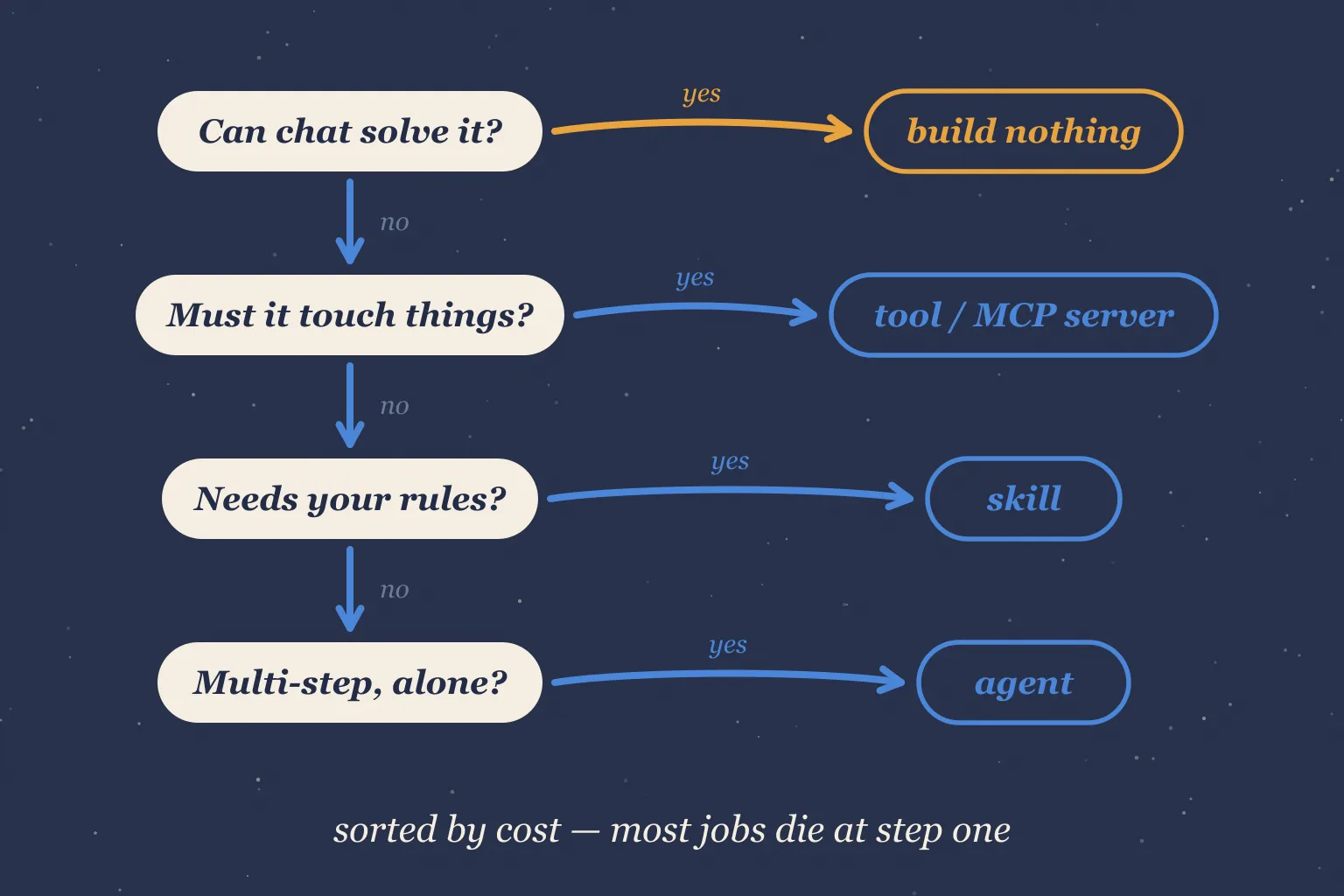
Back to the only question that matters. Given a job, walk this:
- Can pasting text into a chat solve it? Then you're done. Genuinely. Don't build anything.
- Does the model need to touch something — read files, call APIs, write data? You need a tool. Before writing one, check if an MCP server already exists for that system. It usually does.
- Does the model need to know things only your team knows? Write a skill. It's a markdown file. Start there before reaching for anything heavier.
- Does the job require multiple steps without you in the middle? Now, and only now, you're building an agent.
Notice the order. It's sorted by cost. Most tasks die at step 1 or 2, and that's a good death — the system you didn't build is the one that never breaks.
| Term | What it actually is | You need it when… |
|---|---|---|
| Tool | A function the model can request | The model must touch the outside world |
| MCP | A standard for packaging tools | You'd rather plug in than build |
| Skill | Packaged instructions & knowledge | The model needs your rules |
| Agent | Model + tools in a self-directed loop | The job takes steps, not one answer |
| Plugin / connector / function calling | The above, renamed | You're decoding a vendor's docs |
We started with seven confusing terms. We ended with four ideas and a decision list. The vocabulary will keep growing — the ideas underneath have been remarkably stable. Learn the box, not the label.