Lab Day: Building Skills for AI Coding Agents
Teach your AI how you work. A practical guide to writing skills — the files that teach coding agents your conventions and workflows.

The Repetition Problem
You've told your AI agent to use conventional commits three times this week. Yesterday it wrote feat: Added user authentication. Today it's Feature: add auth module. Tomorrow it'll be something else entirely.
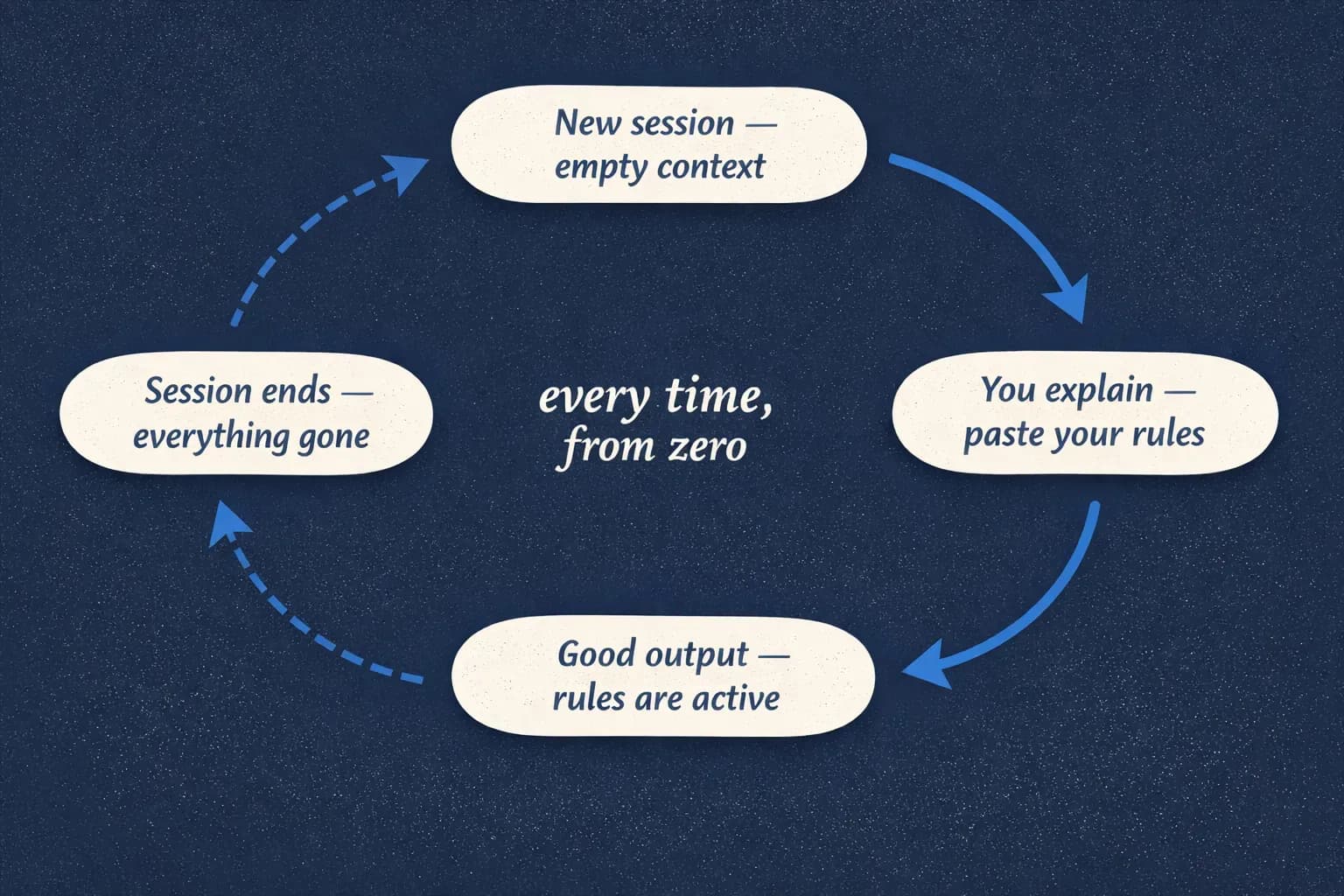
The agent isn't stupid. You're just starting from zero every single time.
A skill is a markdown file that teaches your agent how to handle a specific type of task — every time, without you repeating yourself. Not a one-off prompt. Not a chat message you hope it remembers. A persistent set of instructions that lives in your project.
A prompt is a conversation. A skill is a contract.
But before we get into how to write one, it helps to understand why agents need them in the first place.
Why Skills Exist
AI coding agents — Claude Code, GitHub Copilot, Cursor, Windsurf, whatever you're using — are built on large language models. That sounds obvious, but the implications are worth spelling out because they explain almost every frustrating thing you've experienced with them.
An LLM doesn't "know" your project. Every new conversation, the model sees only what's in its context window — your current message, the files it's been given access to, and its training data. Nothing else. The naming convention you spent ten minutes describing last week? It never happened. The model was trained on the entire internet — millions of blog posts, Stack Overflow answers, GitHub repos — and when you ask it to do something, it generates the most probable output based on all of that. Not based on your project. And "all of that" includes a lot of contradictory advice.
Say you're trying to keep SEO consistent across your website. Every new page needs the right meta tags, OG images, JSON-LD schema, a sitemap update. You tell the agent once and it does a decent job. Next page, it skips the schema. The one after that, it forgets the OG image. It's not being inconsistent on purpose — it literally doesn't know what it did last time. Each response is a fresh statistical prediction, and the prediction drifts.
And it's not just generic checklists. The real pain is the project-specific stuff you figured out the hard way — things that don't live on the internet because they're yours. Say you're building a game and you've tuned your in-game economy for weeks: drop rates, crafting costs, progression curves. None of that is on Stack Overflow. Without something to hold those rules, the agent will confidently suggest values that break your progression every time you add new content.
And here's the part that changes how you think about this. Skills don't just help you build the right thing — they help you check what's already there. Point the agent at existing content and ask it to audit against your rules, and suddenly you have a second pair of eyes that knows exactly what "correct" looks like in your project. New game items that break balance? Flagged. Pages missing schema markup? Flagged. The same file that teaches the agent how to create the right thing also teaches it how to spot the wrong thing. Skills aren't just instructions for writing — they're specifications for reviewing.
So how do you get consistent behavior from something with no persistent memory? You have two options. One: repeat yourself at the start of every conversation. Paste your rules, re-explain your conventions, hope you don't forget anything. Tedious, error-prone, doesn't scale past one person. Two: write it down once, in a file that loads automatically.
Most AI coding agents already support some form of project-level configuration. Claude Code has CLAUDE.md. Cursor has .cursorrules. Windsurf has .windsurfrules. These files sit in your project root and get loaded into every conversation automatically. Think of them as your project's constitution — broad principles, universal rules. "Use TypeScript strict mode." "Write tests for everything." The stuff that applies to everything the agent does in this codebase.
But a constitution isn't an operating manual. "Follow our SEO rules" is fine for CLAUDE.md. The full specification — which meta fields, which schema types, which OG image dimensions, which filename conventions, with examples — is too much detail for a general config file. It clutters the context for every task when it's only relevant to one.
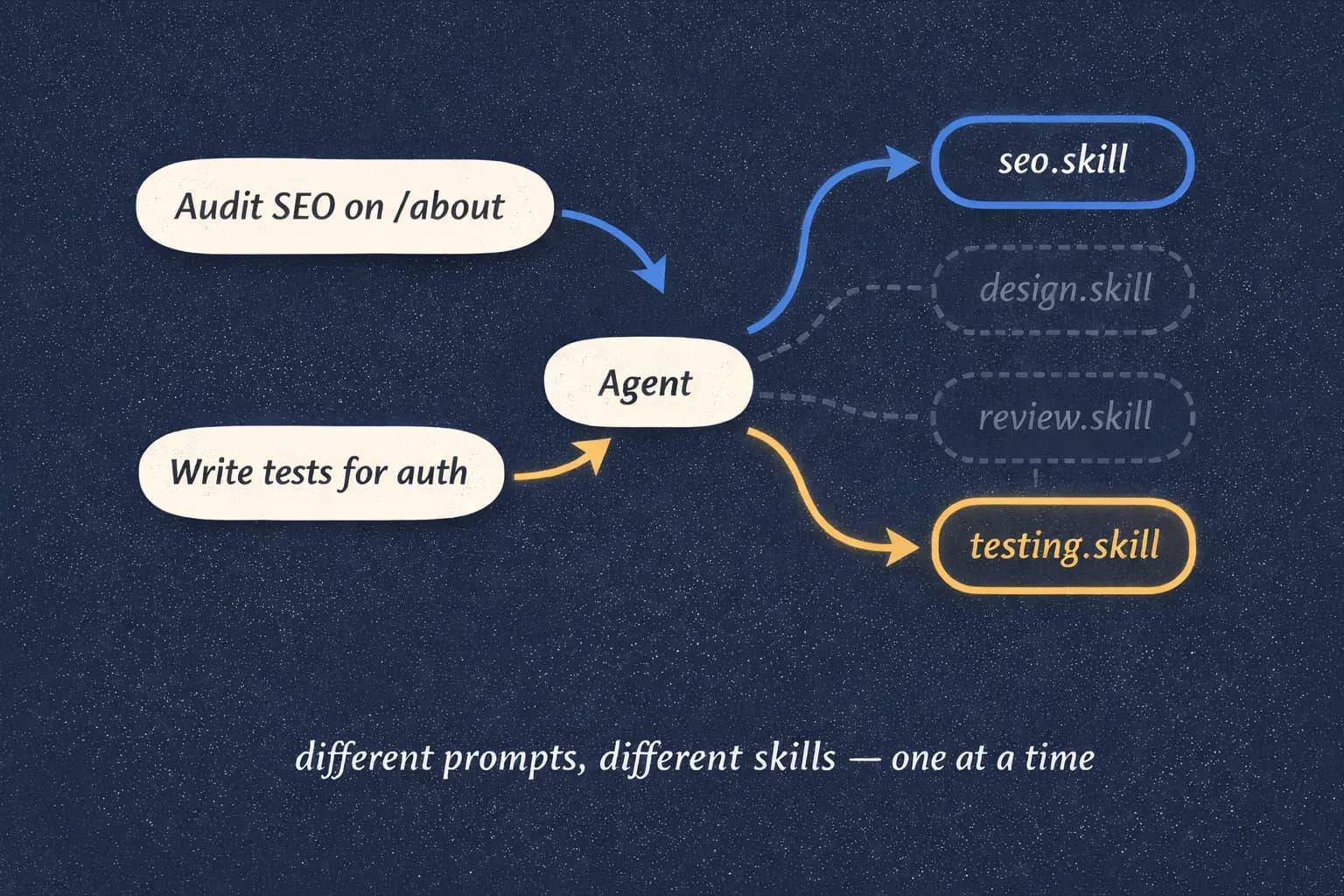
That's where skills come in. A skill is a focused instruction set for a specific type of task. It doesn't load for every conversation — it activates when the agent encounters a matching task. SEO, game balance, commit messages, endpoint scaffolding, code review, database migrations — each gets its own file with its own rules, examples, and constraints. CLAUDE.md points the direction. The skill provides the map.
And you don't always have to write them from scratch. There's a growing ecosystem of skills shared by other developers — people who already figured out how to enforce SEO best practices, or run a thorough code review, or scaffold a clean API endpoint. The richest source right now is GitHub — search for "claude skills" or browse repositories tagged with skill collections. You can grab one, drop it into your project, and customize it to fit your rules. Skills are still early, but the pattern is spreading fast, and the best ones are getting better every month. It's one of those rare moments where you can feel the ground shifting under your feet in a good way.
Now let's see what this looks like in practice.
The Problem with Conventional Commits
Conventional commits follow a simple format: type(scope): description. Everyone knows this. The problem is that "everyone" agrees on the format and disagrees on everything else.
Tell your agent "use conventional commits" and watch what happens. One commit is feat(auth): Add login endpoint. The next is feature: added the login endpoint. Then FEAT: Login endpoint added. All technically defensible. None of them yours.
Is the scope required or optional? Does the description start with a capital letter? Is it feat or feature? Does the body need a blank line separator? What counts as a breaking change?
The internet has many correct answers for each of these questions. Your project has one.
This is the core insight: a skill doesn't define what's universally correct. It defines what's correct here, in this project, for this team. The agent isn't confused because it's bad at commits — it's confused because there are too many "right" answers out there, and you haven't told it which one is yours.
Anatomy of a Skill File
Before we look at what goes inside a SKILL.md file, a quick word on where it lives. In Claude Code, skill files sit in .claude/skills/ at the root of your project, one file per skill. The agent reads this directory automatically — no registration step, no config, no manual loading. You drop a file in, and the next time the agent encounters a matching task, the skill activates.
Other agents follow similar conventions. The exact directory and filename vary, but the pattern is the same: a markdown file in a known location that the agent picks up on its own. The examples in this post use Claude Code's SKILL.md convention, but the principles translate.
Now let's look at what goes inside. Every piece is there for a reason.
Description — Tells the agent when to activate this skill. This is the trigger. Be specific — if the trigger is vague, the agent guesses.
Rules / Procedure — Step-by-step instructions. What to do, in what order. The agent follows these literally, so sequence matters.
Constraints — The "never do this" rules. These are just as important as the positive rules — maybe more. Without explicit constraints, agents get creative. You don't want creative commit messages.
Examples — Input/output pairs. This is where the real teaching happens. Ten lines of explanation lose to one concrete example every time. Agents learn patterns from examples, not paragraphs.
Here's your starting skeleton:
markdown# Skill Name
## Description
When to use this skill. Be specific about the trigger.
## Rules
1. First step
2. Second step
3. ...
## Constraints
- Never do X
- Never do Y
- If Z happens, do W instead
## Examples
**Input:** [what the agent sees]
**Output:** [what the agent should produce]
**Input:** [another scenario]
**Output:** [correct output for that scenario]When to use this skill. Be specific about the trigger.
- First step
- Second step
- ...
- Never do X
- Never do Y
- If Z happens, do W instead
Input: [what the agent sees] Output: [what the agent should produce]
Input: [another scenario] Output: [correct output for that scenario]
That's it. No special syntax, no config files, no build step. A markdown file with clear sections. Let's fill one in.
First Skill: Commit Messages
Here's the scenario. Your company uses Jira. You want every commit tied to an issue number. Your format is type(ISS-123): description — not the generic type(scope) you see in blog posts. The scope is the Jira issue.
markdown# Conventional Commits
## Description
Use this skill when creating git commit messages for any staged
changes. Every commit in this repository must follow these rules
exactly.
## Format
type(ISS-XXX): description
- type: one of feat, fix, refactor, docs, test, chore, ci
- scope: always a Jira issue number in the format ISS-XXX
(e.g., ISS-142, ISS-891). Never use a module name,
folder name, or feature name as scope.
- description: what changed, in imperative mood
## Type Reference
- feat: new feature or user-facing behavior
- fix: bug fix
- refactor: code restructure with no behavior change
- docs: documentation only
- test: adding or updating tests
- chore: maintenance, dependencies, config
- ci: CI/CD pipeline changes
## Rules
1. Description starts with lowercase
2. Description uses imperative mood ("add" not "added" or "adds")
3. No period at the end
4. Maximum 72 characters for the entire first line
5. If the commit needs more context, add a body after a blank line
6. Breaking changes must include a BREAKING CHANGE footer
## Constraints
- Never use a scope other than a Jira issue number
- Never capitalize the first letter of the description
- Never use past tense ("added", "fixed", "updated")
- Never end the description with a period
- If there's no Jira issue for the work, use chore(no-issue): only
for trivial maintenance tasks. Everything else needs an issue.
## Examples
Staged: new login API endpoint for ISS-142
Output: feat(ISS-142): add login api endpoint
Staged: fix null pointer in payment processing for ISS-891
Output: fix(ISS-891): handle null reference in payment service
Staged: moved validation logic to separate module for ISS-203
Output: refactor(ISS-203): extract validation logic to shared module
Staged: added unit tests for user service, related to ISS-142
Output: test(ISS-142): add unit tests for user service
Staged: updated README with new setup instructions
Output: docs(no-issue): update readme with setup instructions
Staged: breaking change to API response format for ISS-445
Output:
feat(ISS-445): restructure api response envelope
BREAKING CHANGE: response wrapper changed from { data, error }
to { result, errors[] }. All clients must update parsing logic.Use this skill when creating git commit messages for any staged changes. Every commit in this repository must follow these rules exactly.
type(ISS-XXX): description
- type: one of feat, fix, refactor, docs, test, chore, ci
- scope: always a Jira issue number in the format ISS-XXX (e.g., ISS-142, ISS-891). Never use a module name, folder name, or feature name as scope.
- description: what changed, in imperative mood
- feat: new feature or user-facing behavior
- fix: bug fix
- refactor: code restructure with no behavior change
- docs: documentation only
- test: adding or updating tests
- chore: maintenance, dependencies, config
- ci: CI/CD pipeline changes
- Description starts with lowercase
- Description uses imperative mood ("add" not "added" or "adds")
- No period at the end
- Maximum 72 characters for the entire first line
- If the commit needs more context, add a body after a blank line
- Breaking changes must include a BREAKING CHANGE footer
- Never use a scope other than a Jira issue number
- Never capitalize the first letter of the description
- Never use past tense ("added", "fixed", "updated")
- Never end the description with a period
- If there's no Jira issue for the work, use chore(no-issue): only for trivial maintenance tasks. Everything else needs an issue.
Staged: new login API endpoint for ISS-142 Output: feat(ISS-142): add login api endpoint
Staged: fix null pointer in payment processing for ISS-891 Output: fix(ISS-891): handle null reference in payment service
Staged: moved validation logic to separate module for ISS-203 Output: refactor(ISS-203): extract validation logic to shared module
Staged: added unit tests for user service, related to ISS-142 Output: test(ISS-142): add unit tests for user service
Staged: updated README with new setup instructions Output: docs(no-issue): update readme with setup instructions
Staged: breaking change to API response format for ISS-445 Output: feat(ISS-445): restructure api response envelope
BREAKING CHANGE: response wrapper changed from { data, error } to { result, errors[] }. All clients must update parsing logic.
Now look at what this skill does that "use conventional commits" doesn't:
- The scope is always a Jira issue, not a vague module name. No ambiguity.
- There's a
no-issueescape hatch, but only for chores. Everything else needs a ticket. - The type list is closed — seven options, no freestyle.
- Imperative mood is explicitly required with counter-examples.
- The breaking change format is defined, not assumed.
Same intent. Completely different output. And it'll be this consistent on commit #1 and commit #500.
- Feature(authentication): Added the login endpoint for users
+ feat(ISS-142): add login api endpointSkills in Action: An API Endpoint
Writing a skill is half the story. The other half is watching the agent use it — and using it yourself to check existing work.
Let's say you've written a skill for API endpoint scaffolding. It defines a file structure (src/routes/{resource}/{action}.ts with separate validation and test files), requires zod for request validation, enforces a consistent error response format, and mandates four minimum test cases per endpoint. The kind of rules your team figured out over months that no one ever wrote down.
Here's what happens when the agent has that skill and you ask it to build something:
You:  Add a POST endpoint for user registration.

Agent: Created 3 files following the api-endpoint skill:

  src/routes/users/create.ts            — route handler, validates
                                          request body before processing
  src/routes/users/create.validation.ts — zod schema for email,
                                          password, name fields
  src/routes/users/__tests__/create.test.ts — 4 test cases:
                                          happy path, missing email,
                                          duplicate user, no auth token

  Error responses use the standard envelope:
  { error: { code, message, details } }

  Route registered in src/routes/index.ts.
No guessing about file names. No forgetting the test file. No inventing a new error format. The skill made every decision before you asked the question.
You can trigger a skill by describing the task in natural language, or invoke it directly with a slash command. Both work. Here's the same skill used as an audit tool:
You:  /api-endpoint audit src/routes/auth/

Agent: Checked src/routes/auth/ against api-endpoint skill.

  ✓ login.ts — correct structure, validation separate, 4 tests
  ✗ register.ts — validation logic is inside the handler,
    not in a separate .validation.ts file
  ✗ forgot-password.ts — only 2 test cases (missing: not found,
    unauthorized). Error response uses raw Error object
    instead of standard envelope.

  2 of 3 endpoints have issues.
The skill that taught the agent how to build the right thing also taught it how to spot the wrong thing. You wrote the rules once. Now they work in both directions.
The Skill Universe
The pattern scales. Once you've written one or two skills, you start seeing them everywhere — every task you keep re-explaining, every standard you keep re-enforcing. Here are some directions worth exploring.
Code review — what to check (security, performance, naming, test coverage), severity levels that mean something, comment rules that prevent "just do X" drive-bys. Teach the agent to review the way your team actually reviews.
Migration writing — naming conventions, reversibility requirements, separating schema changes from data changes. The kind of rules that prevent a 3 AM rollback.
Test scaffolding — where test files live, how they're named, minimum cases per function, which patterns to use for mocking. Stop arguing about test structure in code review.
Component creation — design system tokens, naming conventions, prop patterns, accessibility requirements baked in from the start. Every new component follows the system instead of inventing its own.
SEO checks — required meta tags, OG image dimensions, JSON-LD schema types, sitemap registration. Point the agent at any page and ask "does this meet our SEO spec?"
Accessibility audits — aria attributes, focus management, keyboard navigation, color contrast. A skill that checks what automated tools miss because it knows your component patterns.
The pattern is always the same: rules, constraints, examples. The content changes per domain. One skill is useful. A set of skills that talk to each other is a system. Pick the thing you're tired of repeating.
What I Learned Writing Skills
Be specific. Painfully specific.
Doesn't work:
markdown## Description
For commits.For commits.
Works:
markdown## Description
Use this skill when creating git commit messages
for any staged changes in this repository.Use this skill when creating git commit messages for any staged changes in this repository.
The more precise you are, the less the agent improvises. You don't want improvisation in your commit history.
One example beats ten rules. You can write three paragraphs explaining imperative mood, or you can show:
markdown## Rules
Use imperative mood in the description.
## Examples
- "added" → wrong
- "add" → right
- "fixed" → wrong
- "fix" → rightUse imperative mood in the description.
- "added" → wrong
- "add" → right
- "fixed" → wrong
- "fix" → right
The agent learns patterns from examples faster than from explanations. When in doubt, add another example instead of another rule.
Negative rules are half the skill.
Never capitalize the description.
Never use past tense.
Never end with a period.
Without these, the agent falls back to its defaults — and its defaults come from every coding blog on the internet, not from your project's standards. Explicit "don't" rules close the gaps that positive rules leave open.
Skills are living documents. Your first version will miss things. The agent will produce something unexpected, and you'll realize you never specified that case. Good. Update the skill. Version two is better. Version five is solid. "When the agent gets it wrong, the skill wasn't clear enough" is a more useful mindset than "the agent is broken."
Start with what annoys you. The task you've explained three times this week? That's your first skill. The format you keep correcting? Second skill. The review comment you keep copy-pasting? Third. Annoyance is the best signal for where a skill will save the most time.
Start Here
Your first skill will take 15 minutes. It'll be a bit rough. The agent will follow it and still do something slightly off, and you'll add a constraint you didn't think of. That's the process.
Your tenth skill will take 5 minutes. You'll know exactly what to specify and what to leave out.
You can't make the model smarter. You can make it know your project. Until the next model drops, that's the upgrade path you control.
The thing you're tired of repeating — write that one first.